Introduction
Last week I wanted to add a Wiki to a .Net WinForms project I was working on and surprisingly didn’t seem to find an obvious and simple candidate. With (a lot) of help from ChatGPT I found two great resources which I could use to make one for myself:
With these two controls, a small amount of manual, coding, and a lot of flow-coding, I put together a library:
- CDS.Markdown
In here is a single control:
- CDS.Markdown.MarkdownViewer
It looks like this:
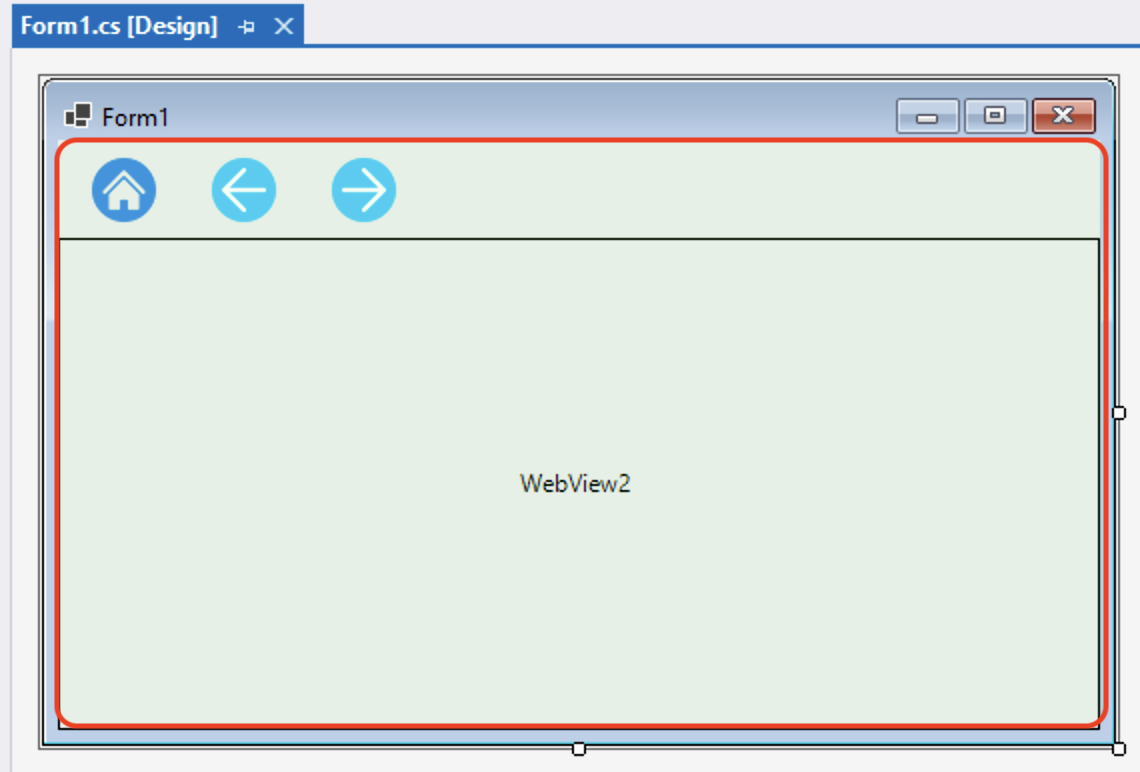
And at runtime, it renders like this:

How to use
- In your .Net 6/8 or Framework project, add the CDS.Markdown package from the NuGet package manager.
- Drag and drop a MarkdownViewer control from the toolbox onto your form.
- Add a line of code to load a markdown file.
For example:
protected async override void OnShown(EventArgs e)
{
    base.OnShown(e);
    await markdownViewer1.LoadMarkdownAsync("Wiki/index.md");
}
In the project you must make sure your markdown files are copied at compile time. For example:


That’s it!
More information
- See the demo project, available on GitHub.
- Package information on NuGet.
- Refer to the Markdown guide for more information on Markdown formatting.
Most of the code and effort was done by GPT4.1 via Copilot in Visual Studio 2022, using Agent mode.
Flow-coding
Flow-coding sits somewhere between conventional coding and vibe-coding. Unlike vibe-coding, which leans heavily on prompt engineering, flow-coding keeps the human deeply engaged in shaping the code while AI tools like Copilot act as an active partner. It’s an ongoing conversation where ideas and code evolve together.



 Carpe Diem Systems Ltd.