Markdown viewer for .Net WinForms

Introduction

Last week I wanted to add a Wiki to a .Net WinForms project I was working on and surprisingly didn’t seem to find an obvious and simple candidate. With (a lot) of help from ChatGPT I found two great resources which I could use to make one for myself:

  1. Markdig: for rendering Markdown using HTML
  2. WebView2: the Microsoft Edge-based rendering engine

With these two controls, a small amount of manual, coding, and a lot of flow-coding, I put together a library:

  • CDS.Markdown

In here is a single control:

  • CDS.Markdown.MarkdownViewer

It looks like this:
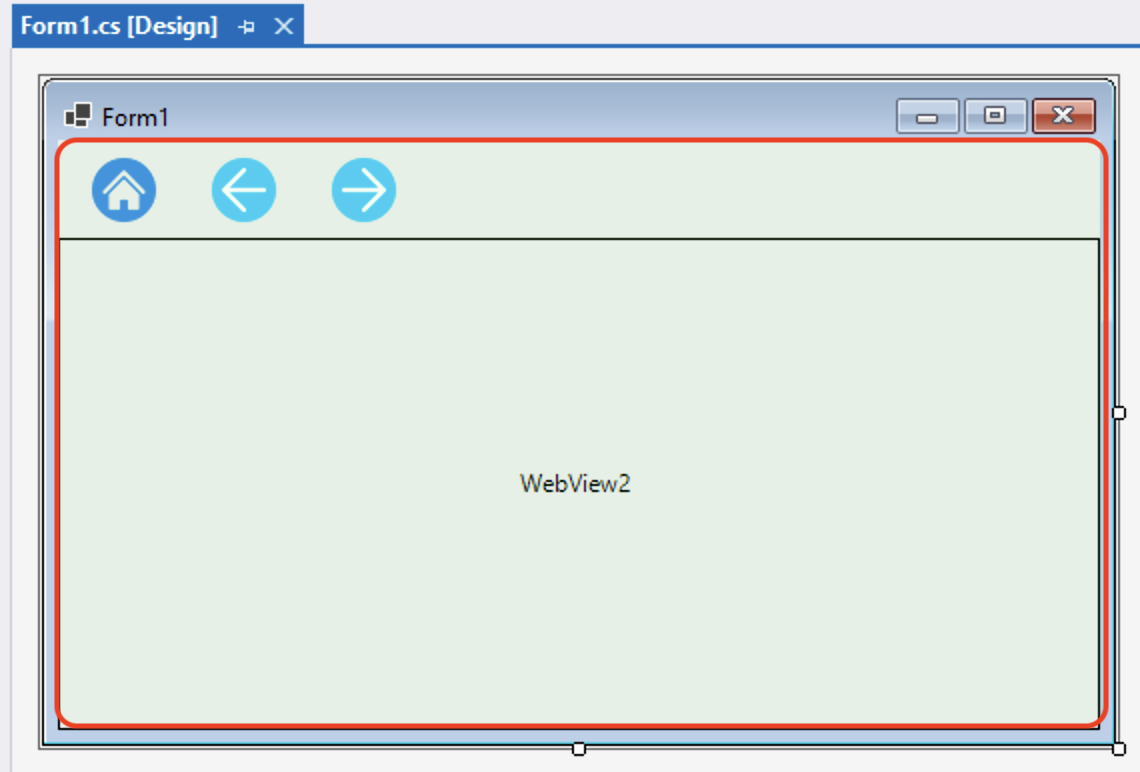
And at runtime, it renders like this:


How to use

  1. In your .Net 6/8 or Framework project, add the CDS.Markdown package from the NuGet package manager.
  2. Drag and drop a MarkdownViewer control from the toolbox onto your form.
  3. Add a line of code to load a markdown file.

For example:

protected async override void OnShown(EventArgs e)
{
    base.OnShown(e);
    await markdownViewer1.LoadMarkdownAsync("Wiki/index.md");
}

In the project you must make sure your markdown files are copied at compile time. For example:

That’s it!


More information

  • See the demo project, available on GitHub.
  • Package information on NuGet.
  • Refer to the Markdown guide for more information on Markdown formatting.

Most of the code and effort was done by GPT4.1 via Copilot in Visual Studio 2022, using Agent mode.


Flow-coding

Flow-coding sits somewhere between conventional coding and vibe-coding. Unlike vibe-coding, which leans heavily on prompt engineering, flow-coding keeps the human deeply engaged in shaping the code while AI tools like Copilot act as an active partner. It’s an ongoing conversation where ideas and code evolve together.

TimeSpan.FromMilliseconds rounding!

Today’s fairly brutal gotcha: TimeSpan.FromMilliseconds accepts a double but internally rounds the value to a long before converting to ticks (multiplying by 10000).

For example, using C# interactive in VS2017:

> TimeSpan.FromMilliseconds(1.5)
[00:00:00.0020000]

> TimeSpan.FromMilliseconds(1234.5678)
[00:00:01.2350000]

Using .FromTicks works as expected:


> TimeSpan.FromTicks(15000)
[00:00:00.0015000]

To be fair this is the documented behavior:

The value parameter is converted to ticks, and that number of ticks is used to initialize the new TimeSpan. Therefore, value will only be considered accurate to the nearest millisecond.

But really, it isn’t expected since the input is a double!

This all came to light because a camera system I’m involved with started overexposing –  the integration time was programmed as 2ms instead of the desired 1.5ms. Hmmph!

So a little alternative:

> TimeSpan TimeSpanFromMillisecondsEx(double ms) =>
    TimeSpan.FromTicks((long)(ms * 10000.0))

> TimeSpanFromMillisecondsEx(1.5)
[00:00:00.0015000]


Note: the FromMilliseconds method delegates to an internal Interval method, passing the milliseconds value and 1 as the scale:


private static TimeSpan Interval(double value, int scale)
{
    if (double.IsNaN(value))
    {
        throw new ArgumentException(Environment.GetResourceString("Arg_CannotBeNaN"));
    }
    double num = value * scale;
    double num2 = num + ((value >= 0.0) ? 0.5 : -0.5);
    if ((num2 > 922337203685477) || (num2 = 0.0) ? 0.5 : -0.5);
    if ((num2 > 922337203685477) || (num2 < -922337203685477))
    {
        throw new OverflowException(Environment.GetResourceString("Overflow_TimeSpanTooLong"));
    }
    return new TimeSpan(((long) num2) * 0x2710L);
}


WCF HttpListenerException

A problem I’ve had for a while:

Running an application from Visual Studio 2013 without administrator privileges and trying to start a WCF service results in a HttpListenerException.

My service host’s URI was http://localhost:8000.

W8x64_2014

The problem goes away when Studio is started with Administrator:

W8x64_2014

But that’s a pain for me for a variety of reasons.

I googled and found lots of information on stackoverflow. I tried to use the developer-reserved Design_Time_Addresses solution on port 8732, and then on 8731, but to no avail.

So then I figured how to look for this URL on my PC. From a command shell run:

netsh http show urlacl

Then I spotted the design time addresses URL:

W8x64_2014

Port 8733 !

So I changed my URI to http://localhost:8733/Design_Time_Addresses and everything worked.

This new URI is only for use when running the service in a debugged session via Visual Studio. For normal runtime use I still use the original URI of http://localhost:8000.

Update: I’m now using the following property to get the URI at runtime:

static public string ServerPath
{
    get
    {
        string serverPath = &amp;quot;http://localhost:8000&amp;quot;;

        if (System.Diagnostics.Debugger.IsAttached == true)
        {
            serverPath = &amp;quot;http://localhost:8733/Design_Time_Addresses&amp;quot;;
        }

        return serverPath;
    }
}