At the time of writing it still isn’t possible to use the NuGet package manager for C++/CLI projects. My workaround is to:
- Add a new C# class library project to the solution.
- Add any NuGet packages to this new project.
- Configure the C# project so it always builds in Release configuration.
- Use the Build Dependencies dialog to ensure that the new C# project is built before the C++/CLI project.
- Add to the C++/CLI project a reference to the NuGet packages by using the output folder of the C# project.
Example
Create a new solution with a C++/CLI class library…
Add a C# class library (.Net Framework), delete Class1.cs, then go to the solution’s NuGet package manager:

Install the Newtonsoft.Json package for the C# project:
Change the C# build configuration so that the Release configuration builds for both Debug and Release:
Then delete the unused Debug configuration: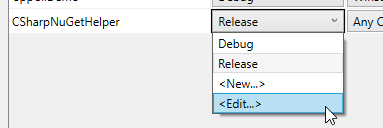

Make C++/CLI project dependent on the C# project:
(Note: I use the above for this dependency rather than adding a reference to the project to avoid copying the unused C# project to the C++/CLI’s output folders.)
Build the solution.
Add a reference to the Newtonsoft library by using the Browse option in the Add References dialog and locating the C# project’s bin/Release folder:

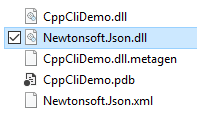
Build the solution again. The Newtonsoft library will now be copied to the C++/CLI build folder:
First test: add some code to the C++/CLI class to demonstrate basic JSON serialisation:
#pragma once

using namespace System;

namespace CppCliDemo {

	using namespace Newtonsoft::Json;

	public ref class Class1
	{
	private:

		String^ test = "I am the walrus";

	public:

		property String^ Test
		{
			String^ get() { return this->test; }
			void set(String^ value) { this->test = value; }
		}

		String^ SerialiseToJson()
		{
			auto json = JsonConvert::SerializeObject(this, Formatting::Indented);
			return json;
		}
	};
}
Then add a simple C# console app, reference just the C++/CLI project, and test the class:
static void Main(string[] args)
{
var test = new CppCliDemo.Class1();
var json = test.SerialiseToJson();
Console.Write(json);
}
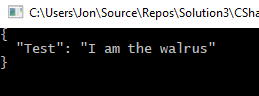
The output – nicely formatted JSON 🙂
Second test, make sure a clean rebuild works as expected:
- Close the solution
- Manually delete all binaries and downloaded packages
- Re-open solution and build
- Verify that the build order is:
- CSharpNuGetHelper
- CppCliDemo
- CSharpConsoleTest (my console test demo app)
- Run the console app and verify the serialisation works as before
 Carpe Diem Systems Ltd.